Think out loud.
“Help me work through this idea.”
Talk through a question or a plan with voice conversation. Cloud voice needs your own provider key and an internet connection.
Explore voiceMeet Zaya. Your everyday AI companion.
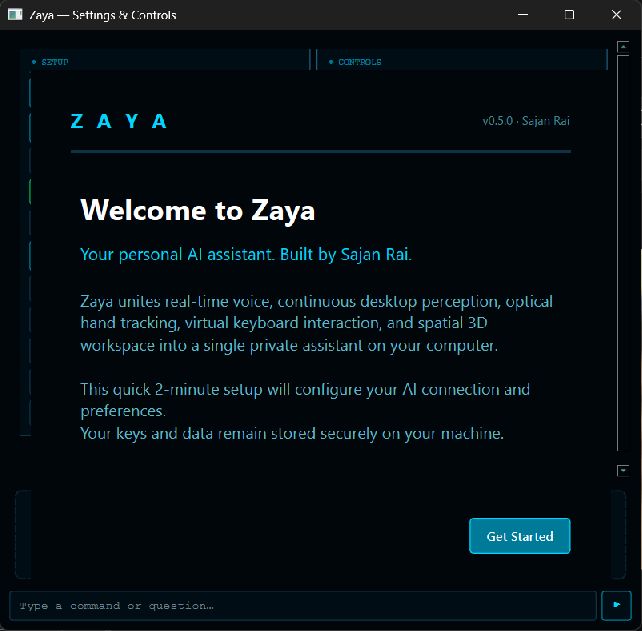
A personal AI assistant for your Windows desktop. Talk naturally, get help with what’s on screen, and work on projects together—with you in control.
Windows 10/11 · Own AI provider key · Early, unsigned beta
 A little company for your desktopREAL APP
A companion with something to do
Three ways to get to know Zaya. These are example requests—not recorded conversations or guaranteed outcomes.
“Help me work through this idea.”
Talk through a question or a plan with voice conversation. Cloud voice needs your own provider key and an internet connection.
Explore voice“Help me understand what’s on my screen.”
Ask for screen context and help with computer tasks. Choose what to share and review actions with Full Access off.
See desktop controls“Use OpenCode to build a simple calculator.”
Add the optional Coding Skill for supervised coding sessions. Work stays in your project, with progress you can follow.
Meet Coding SkillZaya is a personal AI system created to become more than a voice assistant. She can listen, reason, remember, see your screen, operate your computer, work through long-running tasks, write and review code, communicate through your connected services and continue with you on your phone.
Her intelligence is not tied to one model, one interface or one device. Zaya is designed as a system.
At a distance, ice appears simple. Look closer and it becomes an ordered crystalline system — countless relationships forming something precise. Zaya follows the same philosophy: voice, memory, vision, tools, tasks, and devices connecting into one unified structure.
From download to first hello
Get the official Windows installer. Read the unsigned-app notice and check the published checksum.
Bring your own supported AI provider key. Provider pricing and usage limits apply separately.
Choose your microphone and speakers. Keep Full Access off while you learn the controls.
Before you bring her home
Zaya is still growing. Here’s what to expect from this release.
This is an early Windows beta for a small group of testers. Expect bugs. Installation, startup and packaging were checked on the creator’s device; every feature and Windows configuration has not been independently verified.
The current beta download has no charge. You supply your own AI provider credentials; cloud providers can impose usage limits or charge for their services. Optional tools may have separate requirements.
This beta has no verified publisher signature. Windows may warn or block it. Use the official download and checksum, and read the installation guide. Never disable antivirus or Smart App Control to use Zaya.
Unsigned beta updates are installed manually. Download future betas from the official release page. The existing automatic updater accepts signed releases only.
Zaya keeps local archives and configuration on your computer. Requests, audio or images you send to a cloud AI provider are processed by that provider. Read the privacy guide before enabling additional features.
Let’s start small
Try the beta. Tell us what works—and what needs another look.